Table of Contents
- Part One: Understanding ChatGPT Prompts
- What Are ChatGPT Prompts Exactly?
- Why Prompts Matter More Than You Think
- How ChatGPT Reads Your Prompts
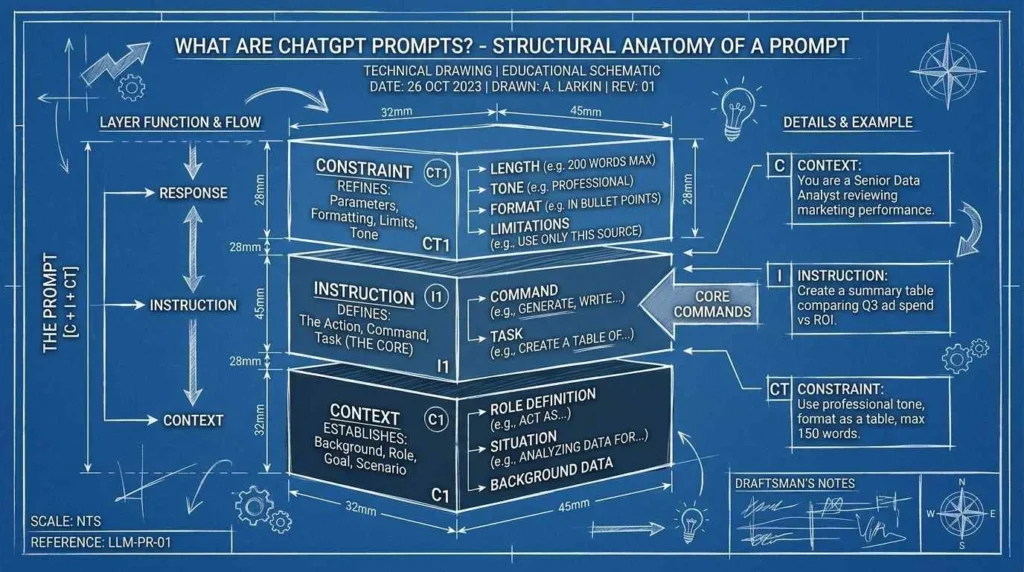
- The Anatomy of a Great Prompt
- Types of ChatGPT Prompts Beginners Should Know
- Part Two: Writing ChatGPT Prompts Like a Pro
- The Golden Rules of Prompt Writing
- Simple Prompts vs. Advanced Prompts
- Role-Playing Prompts That Transform Output
- Format-Specific Prompts for Better Results
- Common Prompt Mistakes Beginners Make
- Part Three: Mastering ChatGPT Prompts for Real Life
- ChatGPT Prompts for Work and Business
- ChatGPT Prompts for Learning and School
- ChatGPT Prompts for Creativity and Fun
- Building Your Personal Prompt Library
- The Future of Prompt Writing
Part One: Understanding ChatGPT Prompts
What Are ChatGPT Prompts Exactly?
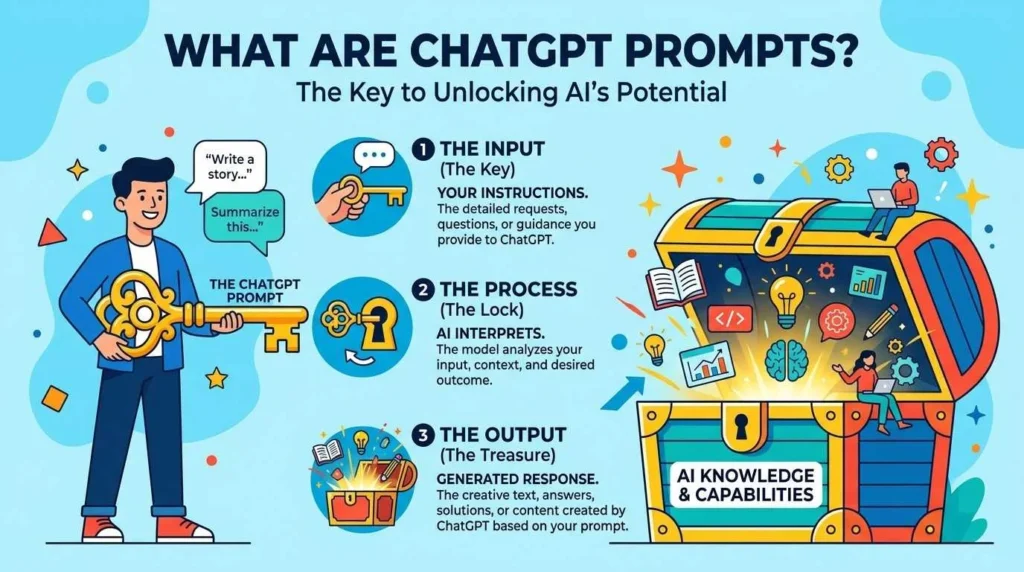
ChatGPT prompts are the words, questions, or instructions you type into the chat box to tell the AI what you want. Think of a prompt like an order at a restaurant. You do not just say “food.” You say “I want a grilled chicken sandwich with extra pickles and no mayo.” The more specific you get, the better your meal tastes. ChatGPT works the same way.
When you open ChatGPT, you see an empty box waiting for your words. Those words are your prompt. You might type “What is the weather like?” or “Write me a poem about the moon” or “Explain quantum physics like I am five years old.” Each of these examples is a ChatGPT prompt. The AI reads your prompt, processes it through its neural network, and generates a response based on patterns it learned from billions of text examples.
ChatGPT prompts come in all shapes and sizes. Some are one word long. Others stretch across multiple paragraphs. Some ask for facts. Others request stories, code, analysis, or advice. The magic of ChatGPT lies in its ability to understand and respond to almost any prompt you throw at it. But here is the secret: the quality of your output depends entirely on the quality of your input. A vague prompt produces vague results. A clear prompt produces clear results. A creative prompt produces creative results.
Understanding what ChatGPT prompts are marks the first step toward mastering AI communication. Every expert prompt engineer started exactly where you are right now: staring at an empty box, wondering what to type. By the end of this guide, you will know exactly what to type and why it works.
Why Prompts Matter More Than You Think
Many beginners treat ChatGPT prompts like Google searches. They type a few keywords and hope for the best. This approach wastes the AI’s true power. ChatGPT is not a search engine. It is a conversation partner, a writing assistant, a coding tutor, and a creative collaborator all rolled into one. But it only becomes those things when you give it proper instructions.
A well-crafted ChatGPT prompt can save you hours of work. It can write your emails, debug your code, brainstorm your business ideas, tutor you through difficult subjects, and even help you write a novel. A poorly crafted prompt leaves you frustrated, scrolling through generic responses that miss the mark completely.
In 2026, prompt engineering has emerged as one of the most valuable skills in the modern workplace. Companies now hire prompt engineers at six-figure salaries. Content creators use prompts to generate articles, scripts, and social media posts. Teachers use prompts to create lesson plans and personalized study guides. Developers use prompts to write and review code faster than ever before.
The reason prompts matter so much comes down to how large language models work. ChatGPT does not think. It does not understand and It predicts. It calculates which words should follow your words based on statistical patterns. When your prompt provides clear context, specific constraints, and a defined goal, the AI’s predictions become more accurate and useful. When your prompt lacks these elements, the AI guesses. And guessing produces inconsistent results.
Learning to write effective ChatGPT prompts is like learning to drive. Anyone can sit in the driver’s seat. But only those who understand the controls, the rules, and the road conditions reach their destination safely and efficiently. This guide gives you that understanding.
How ChatGPT Reads Your Prompts
To write better ChatGPT prompts, you need to understand how the AI actually processes your words. This knowledge transforms you from a random typer into a strategic communicator.
ChatGPT runs on a transformer architecture, a type of neural network trained on vast amounts of text from books, websites, articles, and conversations. When you type a prompt, the AI breaks your text into tokens, which are small pieces of words or whole words. It then analyzes the relationships between these tokens using attention mechanisms. These mechanisms help the AI figure out which words in your prompt matter most and how they connect to each other.
For example, if you write “Write a funny story about a cat who thinks he is a dog,” the AI pays attention to several key elements. It notices “funny” and adjusts its tone toward humor and it sees “story” and switches into narrative mode. Furthermore, it spots “cat” and “dog” and pulls from its training data about pet behaviors and identity confusion tropes. It processes all these signals simultaneously to generate a response that matches your request.
Learn more;
The AI does not remember your previous conversation unless you tell it to. Each prompt exists within a context window, which is like a short-term memory limit. As of 2026, ChatGPT’s context window can handle thousands of words, but it still has limits. This means you should include relevant background information directly in your prompt rather than assuming the AI remembers what you said ten messages ago.
ChatGPT also does not have real-time internet access in most versions. It knows information up to its training cutoff date. It cannot browse the web, check current news, or access your personal files unless specifically connected to tools that allow this. Your prompt must work within these constraints.
Understanding these mechanics helps you write ChatGPT prompts that align with how the AI actually functions. You stop expecting mind-reading and start engineering results.
The Anatomy of a Great Prompt
Every great ChatGPT prompt contains five essential ingredients. Master these ingredients and your prompts will consistently produce better results.
Ingredient One: Clear Intent
Tell the AI exactly what you want. Vague requests produce vague outputs. Instead of “Help me with my essay,” try “Write an outline for a 1,500-word persuasive essay arguing that remote work improves employee productivity. Include three main points with two supporting evidence examples for each.”
Ingredient Two: Specific Context
Give the AI background information. Context shapes relevance. Instead of “Give me marketing ideas,” try “I run a small bakery in Portland, Oregon, specializing in gluten-free pastries. My target customers are health-conscious millennials. Give me five low-cost marketing ideas for Instagram.”
Ingredient Three: Defined Format
Tell the AI how to structure its response. Format controls readability. Instead of “Tell me about dinosaurs,” try “List five fascinating dinosaur species in bullet points. For each, include its size, diet, one unique feature, and the era it lived in.”
Ingredient Four: Tone and Style
Specify the voice you want. Tone creates connection. Instead of “Explain blockchain,” try “Explain blockchain technology in a friendly, conversational tone, as if you are talking to a curious teenager who loves video games.”
Ingredient Five: Constraints and Boundaries
Set limits to focus the output. Constraints drive creativity. Instead of “Write a story,” try “Write a 200-word mystery story set in a lighthouse. Do not use the words ‘dark,’ ‘storm,’ or ‘ghost.’ End with a surprise twist.”
These five ingredients form the backbone of every effective ChatGPT prompt. Beginners often include only one or two. Experts include all five, layered together like a recipe. As you practice, building these ingredients into your prompts becomes automatic.
Types of ChatGPT Prompts Beginners Should Know
ChatGPT prompts fall into several categories. Knowing these categories helps you choose the right approach for your goal.
Informational Prompts
These prompts ask for facts, explanations, or summaries. Examples include “What causes auroras?” or “Summarize the main ideas of Darwin’s theory of evolution in three sentences.” Informational prompts work best when you specify the depth and format you need.
Creative Prompts
These prompts request original content like stories, poems, scripts, or jokes. Examples include “Write a haiku about autumn rain” or “Create a dialogue between a skeptical scientist and a hopeful inventor.” Creative prompts shine when you add constraints, genres, or stylistic requirements.
More Categorization
Analytical Prompts
These prompts ask for evaluation, comparison, or problem-solving. Examples include “Compare the advantages of solar power versus wind power” or “Analyze why this business strategy might fail.” Analytical prompts improve when you provide data, criteria, or frameworks for evaluation.
Technical Prompts
These prompts involve code, math, or structured data. Examples include “Write a Python function that sorts a list of names alphabetically” or “Debug this JavaScript error: TypeError: Cannot read property ‘length’ of undefined.” Technical prompts require precision and often benefit from step-by-step instructions.
Conversational Prompts
These prompts treat ChatGPT like a dialogue partner. Examples include “Let’s debate whether cats or dogs make better pets. You take the cat side” or “Pretend you are a career coach. Ask me questions to help me find my ideal job.” Conversational prompts excel when you establish roles, rules, and goals upfront.
Role-Playing Prompts
These prompts assign a specific persona to the AI. Examples include “Act as a seasoned sushi chef teaching a beginner” or “You are a strict but fair editor. Review this paragraph and mark every grammar error.” Role-playing prompts transform output quality by activating specialized knowledge patterns in the AI’s training data.
Each prompt type serves different purposes. Beginners should practice all of them to build versatility. The more types you master, the more situations you can handle with confidence.
Part Two: Writing ChatGPT Prompts Like a Pro
The Golden Rules of Prompt Writing
Expert prompt engineers follow seven golden rules. These rules separate amateur output from professional-grade results.
Rule One: Be Specific, Not Vague
Specificity drives precision. Compare “Write about dogs” with “Write a 300-word guide for first-time Golden Retriever owners covering grooming, exercise, and common health issues.” The second prompt generates infinitely more useful content.
Rule Two: Use Action Verbs
Action verbs energize prompts. Replace “Can you tell me about…” with “Explain,” “List,” “Compare,” “Analyze,” or “Create.” Verbs command attention and clarify intent.
Rules Furthered
Rule Three: Provide Examples
Examples guide the AI’s pattern-matching. If you want a specific format, show it. “Write three taglines for my coffee shop in this style: ‘Wake up to possibility.’ ‘Brewed for the bold.'”
Rule Four: Layer Your Instructions
Complex tasks need layered prompts. Start with the big picture. Add details. End with constraints. “Write a blog post about sustainable fashion. Target readers are college students. Use a casual, encouraging tone. Include three practical tips under $50. End with a call to action to thrift shop this weekend.”
Rule Five: Iterate and Refine
Your first prompt rarely delivers perfection. Treat prompting as a conversation. If the output misses the mark, tell the AI what to change. “Make this more concise” or “Add more specific examples” or “Change the tone to be more professional.” Each iteration improves the result.
Rule Six: Use Delimiters for Complex Inputs
Delimiters separate instructions from content. Use triple quotes, XML tags, or markdown blocks. “Summarize the following article: “”” [paste article here] “””.” This prevents the AI from confusing your instructions with the material you want processed.
Rule Seven: Test Edge Cases
Push your prompts to their limits. See what happens when you add unusual constraints. “Write a horror story without using the letter ‘e.'” Testing builds your intuition for what the AI can and cannot do.
These seven rules form the foundation of professional prompt engineering. Practice them daily and your skills will compound rapidly.
Simple Prompts vs. Advanced Prompts
Beginners often wonder when to keep prompts simple and when to build advanced structures. The answer depends on your goal and the complexity of the task.
Simple Prompts Work Best When:
- You need a quick answer to a straightforward question
- You are brainstorming ideas and want raw, unfiltered output
- You are testing the AI’s knowledge on a topic
- You want to maintain a fast, conversational flow
Example of a simple prompt: “What are three benefits of meditation?”
Advanced Prompts Work Best When:
- You need structured, formatted output for professional use
- You want the AI to adopt a specific persona or expertise level
- The task requires multiple steps or conditional logic
- Quality and precision matter more than speed
Example of an advanced prompt: “You are a certified financial planner with fifteen years of experience. A 28-year-old software engineer earning $95,000 annually asks for investment advice. They have no debt, a six-month emergency fund, and want to retire by 55. Create a step-by-step investment strategy. Format your response as: 1) Immediate actions this month, 2) Year-one portfolio allocation with percentages, 3) Risk management principles, 4) One common mistake to avoid. Use clear headings and bullet points.”
Notice how the advanced prompt includes role, audience, goal, format, and structure. It gives the AI a complete blueprint to follow.
As a beginner, start simple. Master the basics. Then gradually add complexity. Do not jump into advanced prompting before you understand how the AI responds to simple requests. Build your intuition step by step.
Role-Playing Prompts That Transform Output
Role-playing prompts rank among the most powerful tools in prompt writing. When you assign a role to ChatGPT, you activate a specific subset of its training data. The AI adjusts its vocabulary, tone, and reasoning patterns to match the persona you specify.
How Role-Playing Works
ChatGPT’s training data includes text from doctors, lawyers, chefs, teachers, engineers, artists, and countless other professionals. When you say “Act as a…” the AI shifts its probability distribution toward patterns associated with that role. A doctor uses medical terminology. A chef uses sensory language. A lawyer uses structured arguments.
Examples of Effective Role-Playing Prompts
“Act as a patient kindergarten teacher explaining photosynthesis to a five-year-old. Use simple words, a cheerful tone, and one analogy involving cookies.”
“You are a skeptical venture capitalist reviewing a startup pitch. Identify three weaknesses in this business plan and suggest concrete improvements.”
“Pretend you are a travel blogger who has visited fifty countries. Recommend five underrated destinations for solo female travelers on a budget. Include safety tips and local customs to respect.”
“Assume the role of a Renaissance art historian. Analyze this painting description through the lens of 16th-century Italian artistic movements.”
Each role-playing prompt establishes expertise, perspective, and constraints. The AI cannot actually think like a doctor or a historian. But it can generate text that mimics the patterns of those roles with surprising accuracy.
Learn More
Tips for Better Role-Playing
- Be specific about the role’s experience level. “Junior marketer” produces different output than “CMO with twenty years of experience.”
- Define the audience the role is addressing. A teacher explaining to children uses different language than a teacher lecturing graduate students.
- Add emotional or stylistic modifiers. “Enthusiastic personal trainer” differs from “stern personal trainer.”
- Combine multiple roles for complex tasks. “You are a data scientist and a storyteller. Explain machine learning to business executives using narrative examples.”
Role-playing prompts unlock ChatGPT’s full potential. They turn a generic chatbot into a specialized consultant, creative partner, or educational guide.
Format-Specific Prompts for Better Results
Format controls how information reaches your brain. A wall of text overwhelms. Bullet points scan easily. Tables compare quickly. Code blocks display cleanly. ChatGPT can output in almost any format you specify. You just need to ask.
Bullet Points and Lists
Use these for scannable information. “List the top ten time management techniques for remote workers. Format as numbered bullet points with a one-sentence description for each.”
Tables
Use these for comparisons and structured data. “Compare Python, JavaScript, and Ruby across these dimensions: learning curve, popular use cases, average salary, and community size. Present as a markdown table.”
Code Blocks
Use these for programming and technical content. “Write a CSS snippet that centers a div both horizontally and vertically. Include comments explaining each line. Format as a code block.”
Markdown Headings
Use these for long-form content with clear structure. “Write a 1,000-word guide on composting for beginners. Use H2 headings for main sections and H3 headings for subsections. Include a summary checklist at the end.”
JSON or XML
Use these for structured data extraction. “Extract the following information from this text and format as JSON: author name, publication date, main topic, three key points, and one actionable takeaway.”
Scripts and Dialogues
Use these for creative and educational content. “Write a five-minute podcast script about the history of coffee. Include host introduction, two segments with transitions, and a call to action for listeners to subscribe.”
Step-by-Step Instructions
Use these for procedural content. “Explain how to bake sourdough bread. Break into numbered steps. Include ingredients list, timing for each step, and one troubleshooting tip for common mistakes.”
Specifying format in your ChatGPT prompts serves two purposes. First, it improves readability for you. Second, it forces the AI to organize its thoughts, which often produces more coherent and complete responses.
Common Prompt Mistakes Beginners Make
Even experienced users fall into these traps. Recognizing them early saves you hours of frustration.
Mistake One: Assuming the AI Knows Context
ChatGPT does not know your life, your job, or your previous conversation unless you include that information. Always provide relevant context directly in your prompt.
Mistake Two: Being Too Polite or Too Vague
“Could you maybe possibly help me with something if you have time?” wastes tokens. “Write a Python script that converts CSV files to JSON” gets results faster.
Mistake Three: Expecting Perfection on the First Try
The first response rarely satisfies completely. Plan to iterate. Ask for revisions. Treat prompting as a collaborative process, not a one-shot deal.
Mistake Four: Ignoring the System’s Limitations
ChatGPT cannot browse the live web, access your files, or know private information. Do not ask it to check today’s weather or read your email unless you have connected specific tools.
Mistake Five: Forgetting to Specify Tone
The same information sounds different in a formal report versus a casual blog post. Always include tone instructions. “Explain blockchain in a professional tone for investors” differs massively from “Explain blockchain like you are talking to a curious friend at a party.”
Mistake Six: Overloading a Single Prompt
Asking for ten complex tasks in one prompt confuses the AI. Break large projects into smaller, sequential prompts. Build complexity step by step.
Mistake Seven: Not Using Follow-Up Prompts
The conversation format exists for a reason. If the first response misses something, ask follow-up questions. “Expand on point three” or “Give me a real-world example of this concept” or “Rewrite this for a different audience.”
Avoiding these seven mistakes accelerates your learning curve dramatically. You will spend less time fighting the AI and more time collaborating with it.
Part Three: Mastering ChatGPT Prompts for Real Life
ChatGPT Prompts for Work and Business
Modern professionals use ChatGPT prompts to automate tasks, generate ideas, and improve communication. Here are proven prompt templates for common workplace scenarios.
Email Writing
“You are a senior executive assistant. Draft a professional email to a client apologizing for a delayed project delivery. Acknowledge the inconvenience, explain the cause briefly without making excuses, propose a new timeline, and offer a goodwill discount. Keep the tone warm but professional. Limit to 150 words.”
Meeting Summaries
“Summarize the following meeting transcript into three sections: 1) Decisions made, 2) Action items with owners and deadlines, 3) Open questions requiring follow-up. Use bullet points and bold text for emphasis.”
Presentation Outlines
“Create a ten-slide presentation outline about quarterly sales performance. Include: title slide, executive summary, three key wins with metrics, two challenges with root causes, three strategic initiatives for next quarter, and a closing call to action. Suggest one compelling visual for each slide.”
Brainstorming
“You are a creative director at an advertising agency. Brainstorm twenty tagline options for a new eco-friendly laundry detergent. Target audience: environmentally conscious parents aged 30-45. Avoid clichés like ‘green’ or ‘clean.’ Include five humorous options, five emotional options, and five premium-sounding options.”
Data Analysis
“Analyze the following sales data and identify: 1) Top three growth trends, 2) One concerning pattern, 3) Two actionable recommendations. Present findings in executive summary format suitable for a board presentation.”
These work-focused ChatGPT prompts demonstrate how specific roles, formats, and constraints produce professional-grade output. Adapt the templates to your industry and needs. More related to ChatGPT here.
ChatGPT Prompts for Learning and School
Students and lifelong learners use ChatGPT prompts to understand complex topics, study efficiently, and deepen their knowledge.
Concept Explanation
“Explain the Pythagorean theorem using only everyday objects and situations. Avoid mathematical jargon. Include one visual description I can sketch in my notebook.”
Study Guides
“Create a study guide for my upcoming biology exam on cell structure. Format as a table with three columns: structure name, function, and one analogy to a real-world object. Include ten structures total.”
Essay Feedback
“You are a college writing tutor. Review my draft essay introduction and identify: 1) Strengths of my argument, 2) One logical gap, 3) Two ways to strengthen my thesis statement, 4) One grammar issue to fix. Maintain an encouraging tone.”
Language Learning
“Act as a patient Spanish tutor. I am a beginner. Teach me five common phrases for ordering food at a restaurant. Include pronunciation guides, cultural notes about when to use formal vs. informal versions, and one common mistake English speakers make.”
Math Problem Solving
“Walk me through solving this algebra problem step by step: 3x + 7 = 22. Explain each step as if teaching a confused student. Do not just give the answer. Teach the method so I can solve similar problems alone.”
Memory Techniques
“Create mnemonic devices to help me remember the order of planets in our solar system, the first ten elements of the periodic table, and the seven wonders of the ancient world. Make them weird, funny, and memorable.”
These educational ChatGPT prompts turn the AI into a personal tutor available twenty-four hours a day. The key is treating the AI like a teacher: ask for explanations, request examples, and demand clarity when confusion arises.
ChatGPT Prompts for Creativity and Fun
ChatGPT excels at creative tasks when you give it room to play. These prompts unlock imagination and entertainment.
Story Writing
“Write a 500-word science fiction story about a librarian who discovers that books are actually portals to their settings. Include a twist ending. Use vivid sensory details for at least three different book worlds.”
Character Creation
“Create a detailed character profile for a fantasy novel protagonist. Include: name, age, occupation, one secret fear, one surprising skill, a moral flaw, and a relationship complication. Make them complex and contradictory, like real people.”
Poetry
“Write a sonnet about rain falling on a city at night. Follow Shakespearean sonnet structure: fourteen lines, iambic pentameter, ABAB CDCD EFEF GG rhyme scheme. Use at least three metaphors involving light and shadow.”
Joke Writing
“Write five original jokes about the struggles of remote work. Target audience: millennials who miss office snacks and hate video calls. Make them relatable but not mean-spirited.”
Game Design
“Design a simple text-based adventure game set in a haunted lighthouse. Create three rooms, two puzzles, one friendly ghost, and one scary ghost. Write the opening scene in second-person perspective.”
Recipe Creation
“Invent a fusion recipe combining Italian and Japanese cuisines. Name the dish, list ingredients with measurements, provide step-by-step cooking instructions, and suggest one wine or tea pairing. Make it achievable for home cooks with basic skills.”
These creative ChatGPT prompts demonstrate that the AI is not just a tool for work. It is a partner for imagination. The more specific and playful your prompts, the more surprising and delightful the output becomes.
Building Your Personal Prompt Library
As you practice writing ChatGPT prompts, you will develop favorites that work repeatedly. Save these in a personal prompt library for quick access and continuous improvement.
How to Build Your Library
Start a dedicated document, note-taking app, or spreadsheet. For each prompt you write, record: the exact prompt text, the context where you used it, the quality of the output, and any follow-up prompts that improved the result. Over time, patterns emerge. You will notice which phrasings produce the best results. You will identify your own prompting style.
Categories to Organize Your Library
- Work and productivity
- Learning and education
- Creativity and entertainment
- Personal growth and reflection
- Technical and coding tasks
- Communication and writing
Review and Refine Monthly
Set a monthly reminder to review your prompt library. Delete prompts that no longer work due to AI updates. Refine prompts based on new techniques you have learned. Add prompts inspired by articles, videos, or conversations with other AI users.
Share and Learn from Others
Join online communities where prompt engineers share their best work. Reddit, Discord servers, and LinkedIn groups host active discussions about prompt writing. Seeing how others structure their prompts expands your own possibilities.
Your personal prompt library becomes a competitive advantage. While others start from scratch each time, you deploy proven templates instantly. This efficiency compounds over time, saving you hundreds of hours annually.
The Future of Prompt Writing
The field of prompt engineering evolves rapidly. What works today may change tomorrow as AI models improve and new capabilities emerge. Here are key trends shaping the future of ChatGPT prompts in 2026 and beyond.
Multimodal Prompts
Future ChatGPT versions accept not just text but images, audio, and video as prompt inputs. You will point your camera at a broken appliance and ask “How do I fix this?” You will upload a sketch and request “Turn this into a website wireframe.” You will hum a melody and say “Turn this into a full song arrangement.” Learning to craft prompts across multiple modalities becomes essential.
Tool-Connected Prompts
ChatGPT increasingly connects to external tools: web browsers, code interpreters, databases, and personal files. Prompts will specify not just what to create but which tools to use. “Search the web for recent studies on sleep and productivity, analyze the data, and create a summary slide deck” becomes a single prompt.
Collaborative Prompting
Teams will share prompt libraries, refine them collectively, and build organizational prompting standards. Companies will hire Chief Prompt Officers to govern how employees interact with AI. Prompt quality becomes a measurable business metric.
Personalized Prompts
AI systems will learn your personal prompting style and adapt to it. The AI will anticipate your formatting preferences, your typical follow-up requests, and your industry-specific vocabulary. Prompting becomes less about explicit instruction and more about collaborative refinement.
Ethical Prompting
As AI capabilities grow, so do responsibilities. Prompt engineers must consider bias, misinformation, and harmful outputs. The future includes prompts that explicitly request ethical considerations: “Write this product description ensuring inclusive language” or “Analyze this dataset while checking for demographic bias.”
Staying current with these trends keeps your prompt writing skills sharp and relevant. The beginners who invest in learning today become the experts who shape tomorrow.
Conclusion
ChatGPT prompts are the keys that unlock artificial intelligence. Every word you type shapes the response you receive and every detail you include sharpens the output. Furthermore, every format you specify improves the delivery. This guide gave you the complete foundation: what prompts are, why they matter, how the AI reads them, what ingredients make them great, what types exist, how to write them professionally, how to avoid common mistakes, and how to apply them across work, learning, and creativity.
You now possess the knowledge that separates casual users from skilled practitioners. The empty chat box no longer intimidates you. It invites you. Start simple. Add complexity gradually. Build your personal prompt library. Iterate relentlessly. Share your discoveries with others. The future belongs to those who can communicate clearly with intelligent machines. That future starts now. That communicator is you. For a video, click here.

The author is a Ph.D scholar and writes on multiple topics of interests related to science, technology, society, history etc. The purpose behind all this stuff is to raise public awareness in different domains.